Meta Just Made Your Website Optional. Here’s Why We’re
Opting Out of Product Browsing (For Now)
From 28 October 2026, Meta’s product browsing sends taps on existing Facebook and Instagram ads to an in-app product page instead of your website. For ecommerce brands, that means fewer site sessions, weaker pixel data and shrinking retargeting audiences — so opt out before the 28th and test it in a controlled split against real sales.
Meta Social audits Meta ad accounts for UAE brands and runs controlled tests on every platform change, judging each one on backend revenue, not Ads Manager.
Every few months Meta announces a change that sounds like a small product tweak. Product browsing isn’t one of them.
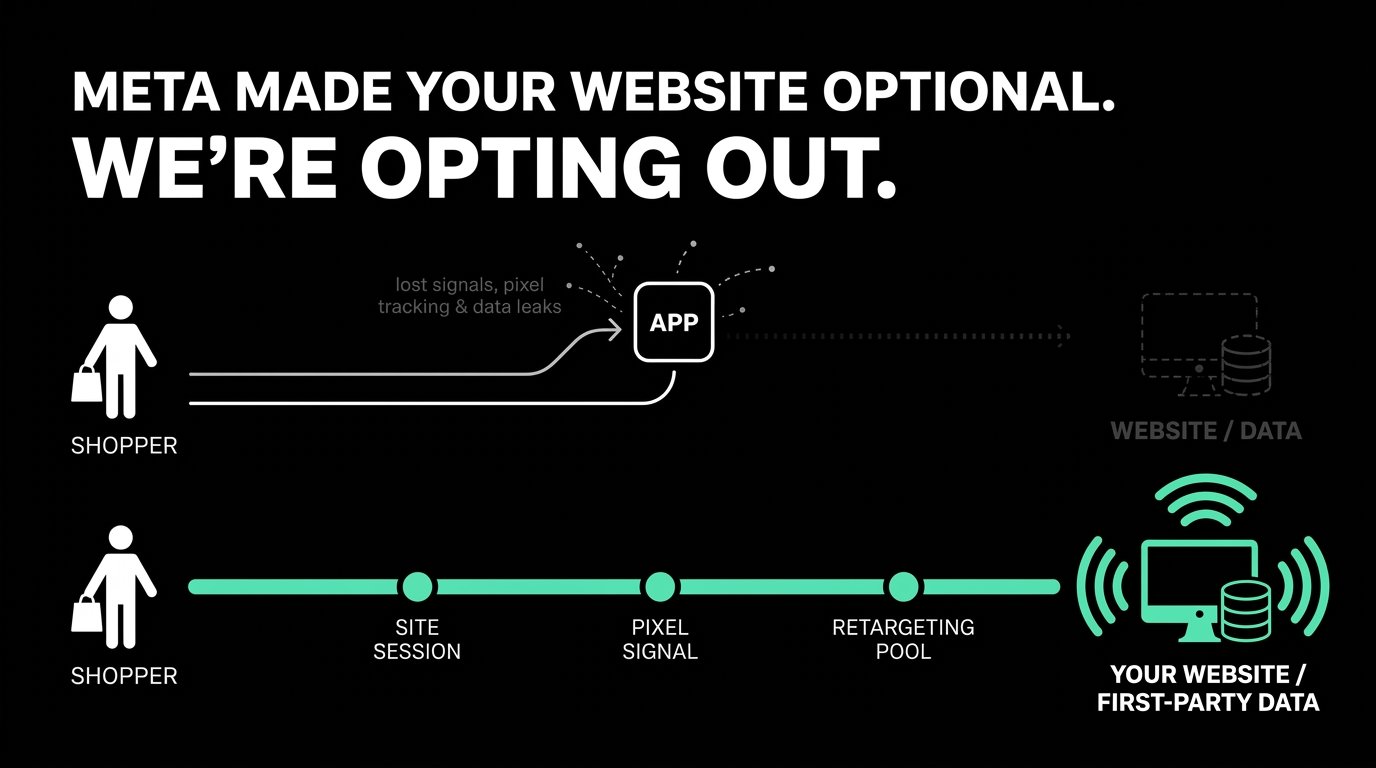
On the surface, it’s a new landing experience: tap an ad, see the product inside Facebook or Instagram. Underneath, it’s Meta moving the most valuable part of your funnel – the moment a shopper shows real interest – from your property to theirs. And it’s being switched on by default, for ads you’ve already approved, with a single averaged statistic as the justification.
This is how we’re thinking about it for our clients, and why our default answer is “not yet”. It’s also the kind of change any serious Meta ads agency should flag before it goes live, not after.
The 3% Meta Won’t Explain
Meta’s case for product browsing is one number: advertisers in a test from 6 to 21 August 2026 saw “3% more conversions” on average, across roughly 117,700 advertisers.
Read that sentence the way a CFO would.
- More conversions of what? If an in-app product view or add-to-cart counts as a conversion, a feature that keeps people inside the app will naturally produce more of them.
- Measured by whom? The feature, the test and the conversion count all belong to Meta. No independent check is mentioned.
- Averaged across whom? A 3% average across 117,700 accounts can hide thousands that lost sales. Meta hasn’t published the spread.
- Over how long? Fifteen days captures the first click. It doesn’t capture what happens to your retargeting, email list or repeat purchases a month later.
None of this means the feature doesn’t work. It means the evidence is designed to get you to leave it on, not to tell you whether you should.
Meta Isn’t Taking Your Click. It’s Taking Your Data.
Since Apple’s privacy changes, the brands that win at performance marketing on Meta are the ones that feed it the best first-party data: on-site behaviour, purchase values, customer lists. Your website is where almost all of that is created.
When a shopper browses inside Meta instead:
- The browsing behaviour belongs to Meta. Which products they compared, how long they looked, what they ignored. That is exactly the kind of signal that improves targeting, and it now sits in Meta’s systems, not yours.
- Your Conversions API sends less. Fewer site sessions mean fewer events, so your own measurement gets thinner while Meta’s gets richer.
- The customer relationship moves. Email and SMS sign-ups, loyalty prompts and post-purchase journeys only happen on your site. A shopper who never arrives is a shopper you can’t market to again without paying Meta.
That’s the real trade. Not your click, but your ability to know your customers without renting access to them.
The Cost Shows Up Three Weeks Later
The most dangerous effects of product browsing don’t appear in the week you switch it on.
- Week one: Ads Manager shows stable or slightly better results. Everything looks fine.
- Weeks two and three: your “website visitors” and “viewed product” audiences start shrinking, because fewer people reach your site.
- Week four onwards: retargeting campaigns run out of people, frequency climbs, and cost per purchase on your best-performing audiences rises. Meanwhile Google Analytics shows Meta traffic falling, and someone in the business asks why Meta “stopped working”.
By the time the damage is visible, nobody connects it to a default setting changed a month earlier.
Why This Is Bigger Than One Feature
Product browsing fits a clear direction. Meta’s ad system increasingly decides who sees your ad, which creative runs, where it appears and how it’s measured. Keeping the shopping journey inside the app completes the loop: Meta finds the shopper, shows the product, records the outcome and reports the result.
For advertisers, the strategic question isn’t “is this feature good?” It’s “how much of my growth do I want to depend on a system I can’t audit?” The brands that stay in control will be the ones that protect the assets Meta can’t take: their website experience, their first-party data and their direct customer relationships. A good Meta Partner helps you protect those assets, not hand them over by default.
Keep It Off, Test It or Turn It On: A Decision Framework
|
Your situation |
Our recommendation |
Why |
|
Premium or luxury brand, strong website experience |
Keep it off |
Brand experience and customer data are worth more than a possible 3% |
|
Retargeting and email drive a large share of revenue |
Keep it off |
Shrinking site audiences hits your most profitable campaigns |
|
Large catalogue, many similar products, decent site |
Test it |
Meta’s suggestions may help discovery, but prove it on backend sales |
|
Slow mobile site with high bounce rates |
Test it, then fix the site |
In-app may convert better short term, but you’re renting the fix |
|
Marketplace seller with little first-party data |
Consider turning it on |
You have less to lose and possibly faster checkout to gain |
Most UAE brands we work with – especially in fashion, beauty, fragrance and home – fall into the first two rows. As an AI agency in Dubai brands use for automated campaigns, we see the same pattern every time: Meta’s AI features pay off only when they’re tested against the business, not switched on by default.
How to Test It Without Fooling Yourself
If you test product browsing, test it the way you’d test a price change, not a creative.
- Opt out first. Use the opt-out in Meta’s notice before 28 October, then switch it on only where you’re testing, via Advantage+ Creative and Destination settings.
- Split cleanly. Duplicate one campaign: same budget, audience and creative, with product browsing on in one and off in the other. Run it for at least three weeks.
- Choose a backend primary metric. New-customer revenue from your store or CRM – not Ads Manager purchases.
- Set guardrails. Track retargeting audience size, email capture rate, average order value and Meta-sourced site sessions. A “win” that shrinks these isn’t a win.
- Read it at 30 days, not 15. Meta’s test stopped at 15 days. Yours shouldn’t.
FAQs
Q: When does Meta product browsing start?
A: Meta switches on product browsing for existing Facebook and Instagram ads on 28 October 2026, unless you opt out.
Q: How do I turn off product browsing in Meta Ads?
A: Use the opt-out button in Meta’s notice before 28 October, or switch it off per ad at any time in Advantage+ Creative and Destination settings.
Q: Will opting out hurt my ad performance?
A: No. Opting out keeps your ads working as they do today. You only give up Meta’s claimed 3% uplift, which you can test for yourself.
Q: Does product browsing apply to new ads?
A: Meta’s notice refers to existing ads. It doesn’t say whether new ads default to on, so check the setting at every launch.
Q: Why would Meta want shoppers to stay in the app?
A: In-app browsing gives Meta more data about shopping behaviour and more control over the journey from ad to purchase. That can help its targeting, but it shifts data and customer relationships away from your website. We explain how Meta’s 2026 reporting changes already favour the platform in Are Your Meta Ads Numbers Real?
Key Takeaways
- Meta switches on product browsing for existing ads on 28 October 2026. Opt out first, decide later.
- Meta’s “3% more conversions” is unaudited, averaged across 117,700 advertisers and measured over just 15 days.
- The real cost is data: smaller retargeting pools, thinner Conversions API signals and fewer customer relationships you own.
- Judge product browsing on backend revenue, never on Ads Manager alone.
- If you test it, use a clean 50/50 split for at least 30 days.
Meta Social — Dubai’s #1 Performance Marketing Agency
Meta Social is a Dubai performance marketing agency. Our performance marketing work connects to the rest of our services (SEO & GEO, AI creatives & video, and attribution architecture), so every platform change is judged on what it does to your actual sales, not just what Ads Manager reports. Learn more at metasocial.ae.
Performance Marketing | SEO & GEO | AI Creatives & Video | Attribution Architecture
metasocial.ae | Dubai, UAE
About Meta Social
Meta Social is Dubai’s leading performance marketing agency and the GCC’s AI-native growth partner. We specialise in Performance Marketing, SEO & GEO, AI Creatives & Video, and Attribution Architecture — managing AED 50M+ in paid media across real estate, fintech, e-commerce, and hospitality.
metasocial.ae | Dubai, UAE